> ## Documentation Index
> Fetch the complete documentation index at: https://docs.schoolmaker.com/llms.txt
> Use this file to discover all available pages before exploring further.
# API Quickstart
> The SchoolMaker REST API lets you manage your members and track your school's activity.
## Authentication
Only schools on the **Pro** and **Business** plans will get access to the SchoolMaker API. You can upgrade your plan from your school's billing settings or contact our support team if you want to get API access.
Your SchoolMaker API key should never be used client side or exposed to your end users.
Start here if you want to use the SchoolMaker API to manage your members or track your school activity.
To get started, you’ll need an API key. Go to `Settings` -> `Integration & API` in your SchoolMaker settings and scroll down to the API Section.
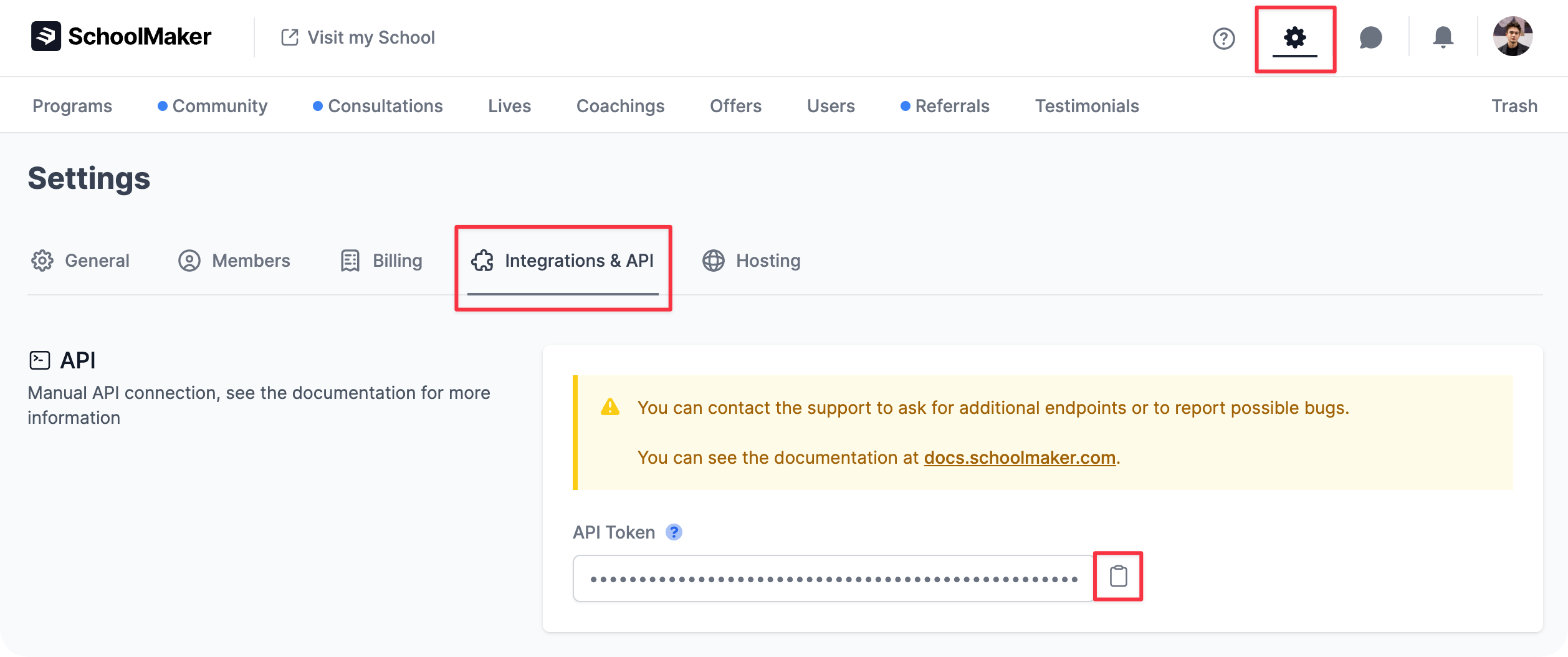 You will be able to copy your API key by clicking on the clipboard button.
When making an API call, you will need to add an Authorization header and set the API key as a Bearer token.
Here’s an example Curl request (replace `YOUR_API_KEY` with your own API key):
```bash theme={null}
curl --request GET \
--url https://schoolmaker.co/api/v1/products \
--header 'Authorization: Bearer YOUR_API_KEY'
```
## Rate Limiting
Exceeding rate limits may temporarily block your API access. If you hit the limit, you'll get a 429 Too Many Requests response. Handle limits carefully.
The SchoolMaker API uses rate limits to manage request volumes and ensure fair usage.
**Rate Limit Headers**:
Each API response includes headers to help you track your usage:
* X-RateLimit-Limit: Maximum requests allowed per period.
* X-RateLimit-Remaining: Requests left in the current period.
* X-RateLimit-Reset: Time when the limit resets (epoch time).
**Rate Limiting Rules**:
General API Requests: 5 requests per second per IP.
## Base URL
```
https://schoolmaker.co/api/v1
```
## Response Format
All responses are in JSON format. Successful responses will contain the requested data, while error responses will have this structure:
```json theme={null}
{
"error": "Error message or array of error messages"
}
```
## HTTP Status Codes
* 200: Success
* 201: Created
* 204: No Content
* 400: Bad Request
* 401: Unauthorized
* 404: Not Found
* 422: Unprocessable Entity
* 500: Internal Server Error
## Debugging
Sometimes things go wrong. Here are some tips to help you debug your API requests.
If you are having trouble with the API, we recommend using a tool like [Postman](https://www.postman.com/) to test your requests.
1. Dealing with “Not Authenticated” Codes:
* Make sure you are using an API key from the SchoolMaker "Integrations & API" settings page and that you are including it in your requests.
* Your API key should be included in the “Authorization” header of your request, following the format “Authorization: Bearer YOUR\_API\_KEY”.
2. Authorization Header:
* Ensure that you are correctly including the “Authorization” header in your requests. The value of this header should follow the format “Bearer YOUR\_API\_KEY”.
3. Handling 400-level Responses:
* 400-level responses typically indicate that there was a problem with the request. The response body will contain more information about what went wrong, so be sure to check it for details.
* Check on your request type (GET, POST, PUT, DELETE) and ensure that you are using the correct one for the endpoint you are trying to access.
If you have followed these steps and are still experiencing issues, don’t hesitate to [reach out to the SchoolMaker team](mailto:support@schoolmaker.co) for further assistance.
## Where to find IDs?
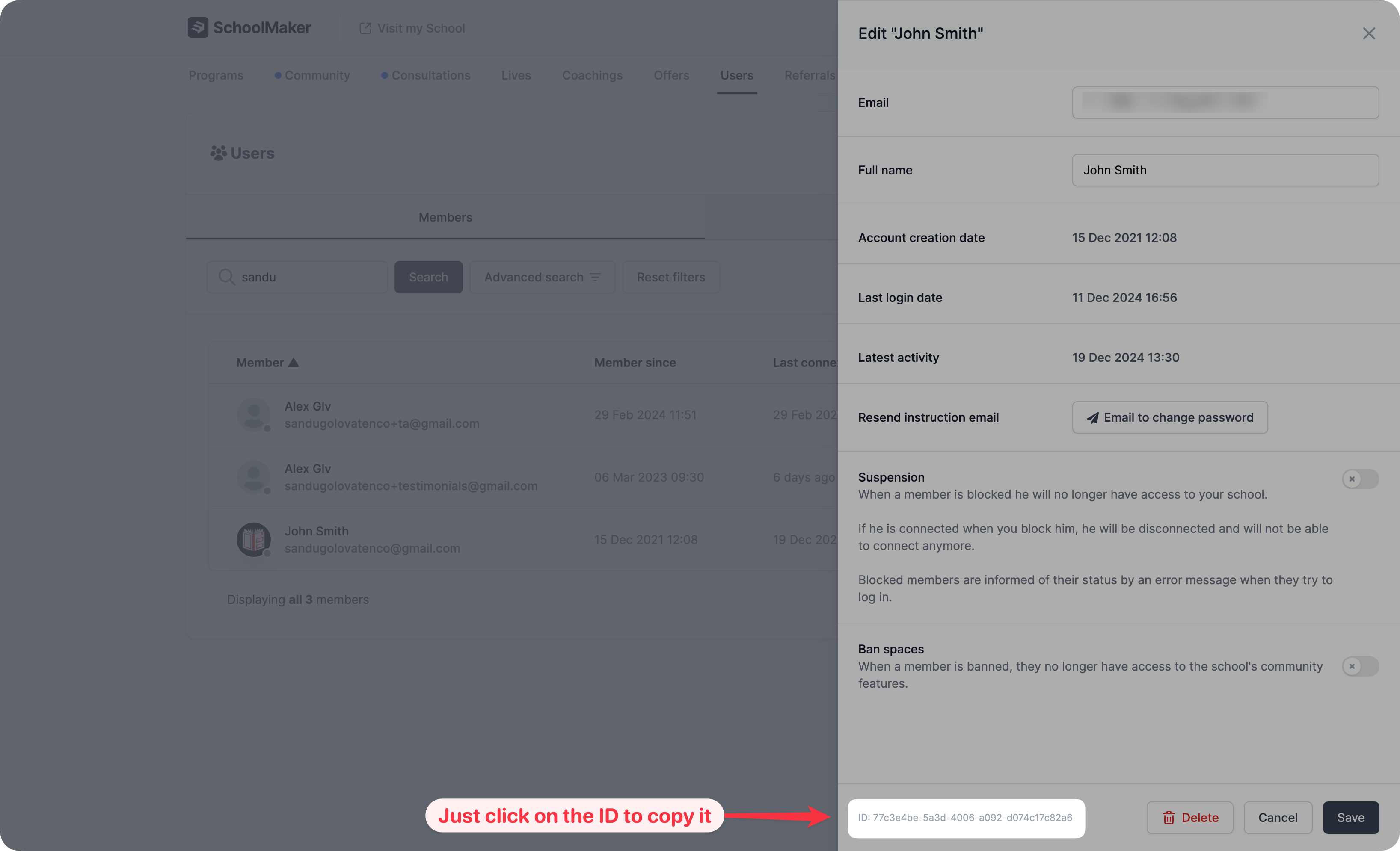
**✨ New**: It is now possible to easily copy IDs from your school UI in one click. You will usually find this ID when editing or in the settings of the element for which you need an ID.
You will be able to copy your API key by clicking on the clipboard button.
When making an API call, you will need to add an Authorization header and set the API key as a Bearer token.
Here’s an example Curl request (replace `YOUR_API_KEY` with your own API key):
```bash theme={null}
curl --request GET \
--url https://schoolmaker.co/api/v1/products \
--header 'Authorization: Bearer YOUR_API_KEY'
```
## Rate Limiting
Exceeding rate limits may temporarily block your API access. If you hit the limit, you'll get a 429 Too Many Requests response. Handle limits carefully.
The SchoolMaker API uses rate limits to manage request volumes and ensure fair usage.
**Rate Limit Headers**:
Each API response includes headers to help you track your usage:
* X-RateLimit-Limit: Maximum requests allowed per period.
* X-RateLimit-Remaining: Requests left in the current period.
* X-RateLimit-Reset: Time when the limit resets (epoch time).
**Rate Limiting Rules**:
General API Requests: 5 requests per second per IP.
## Base URL
```
https://schoolmaker.co/api/v1
```
## Response Format
All responses are in JSON format. Successful responses will contain the requested data, while error responses will have this structure:
```json theme={null}
{
"error": "Error message or array of error messages"
}
```
## HTTP Status Codes
* 200: Success
* 201: Created
* 204: No Content
* 400: Bad Request
* 401: Unauthorized
* 404: Not Found
* 422: Unprocessable Entity
* 500: Internal Server Error
## Debugging
Sometimes things go wrong. Here are some tips to help you debug your API requests.
If you are having trouble with the API, we recommend using a tool like [Postman](https://www.postman.com/) to test your requests.
1. Dealing with “Not Authenticated” Codes:
* Make sure you are using an API key from the SchoolMaker "Integrations & API" settings page and that you are including it in your requests.
* Your API key should be included in the “Authorization” header of your request, following the format “Authorization: Bearer YOUR\_API\_KEY”.
2. Authorization Header:
* Ensure that you are correctly including the “Authorization” header in your requests. The value of this header should follow the format “Bearer YOUR\_API\_KEY”.
3. Handling 400-level Responses:
* 400-level responses typically indicate that there was a problem with the request. The response body will contain more information about what went wrong, so be sure to check it for details.
* Check on your request type (GET, POST, PUT, DELETE) and ensure that you are using the correct one for the endpoint you are trying to access.
If you have followed these steps and are still experiencing issues, don’t hesitate to [reach out to the SchoolMaker team](mailto:support@schoolmaker.co) for further assistance.
## Where to find IDs?
**✨ New**: It is now possible to easily copy IDs from your school UI in one click. You will usually find this ID when editing or in the settings of the element for which you need an ID.
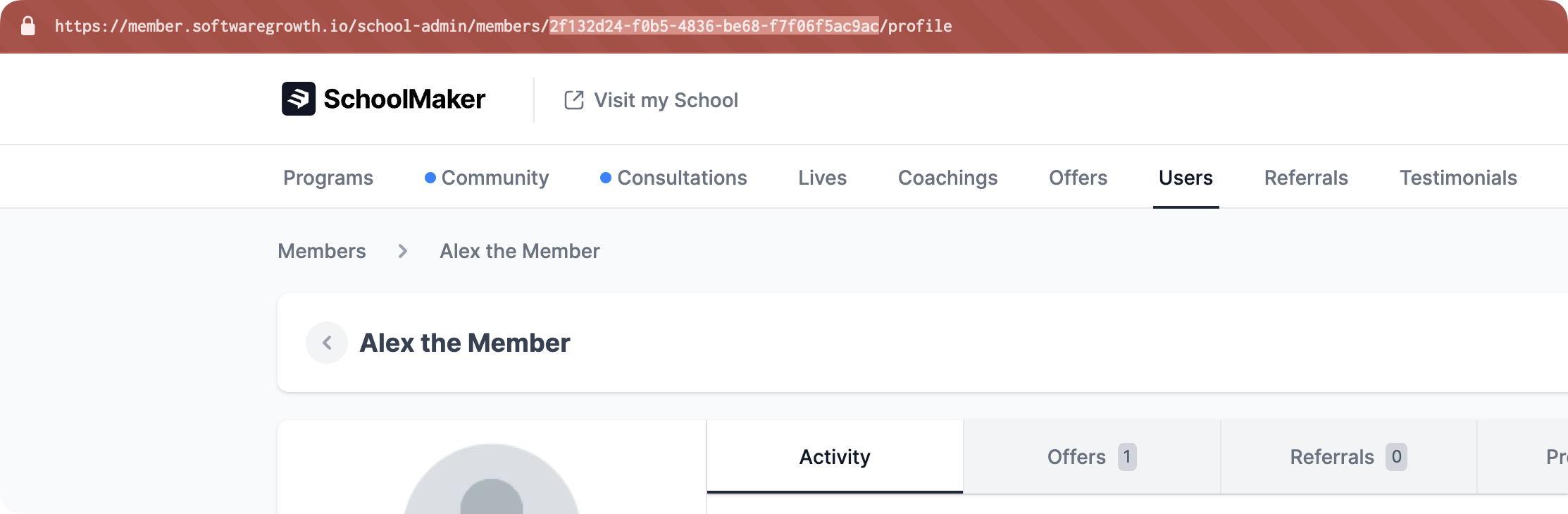
 To find a **member ID**, go to the member's profile in your admin space, and copy the ID from the current URL:
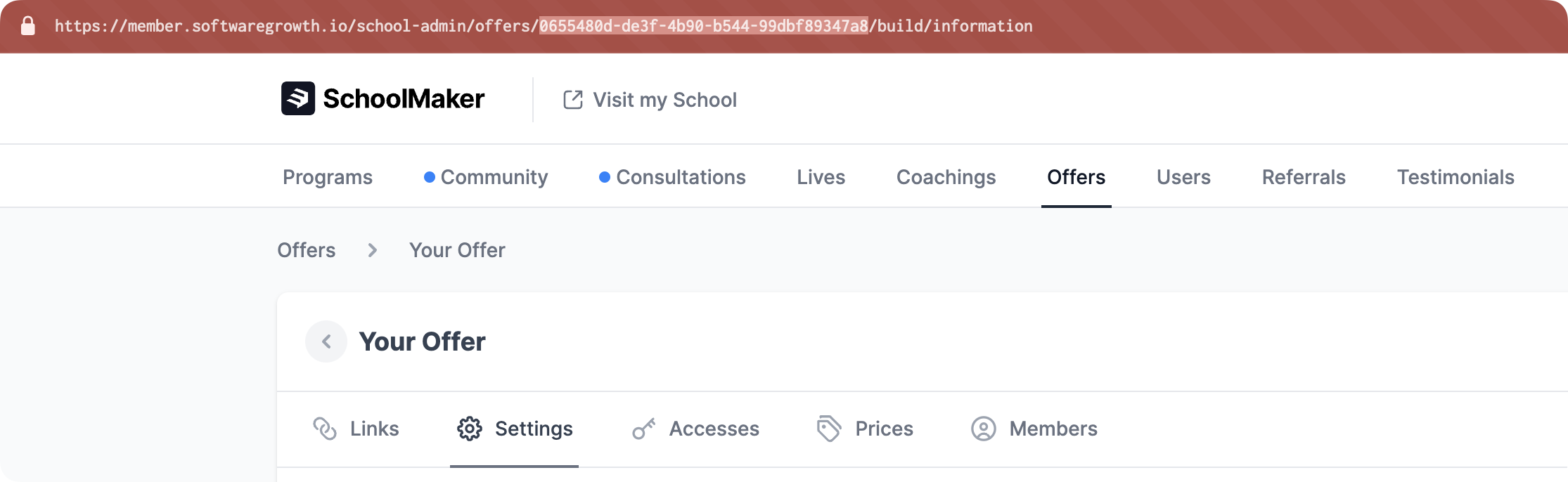
 To find an **offer ID**, go to the offer in your admin space, and copy the ID from the current URL:
 To find a **program ID**, go to the program in your admin space, and copy the ID from the current URL:
 ## Members
The SchoolMaker API allows you to get information about your members:
Get details from a member like their first name, last name, email, or creation date
Get a list of your school's members. Note that this list has pagination
Get a detailed list of which offers a specific member has access to
## Admins & Moderators
The SchoolMaker API allows you to get information about admins & moderators in your school:
Get a list of your school's admins and moderators, with details about each
Get details from a specific admin or moderator from your school
## Offers
Configure and list your school's offers:
List all of your school's offers and get their names, descriptions & prices
Get details from a specific offer like its name, description, prices or creation date
Updates offer’s name, description, and publish status
Updates the drip boost value for a specific member in a specific offer
Change member access status for a specific offer in your school or add a new member
## Programs
List school programs and get more information about specific programs and member progressions:
List all of your school's published programs with their IDs, names & descriptions
Get details from a specific program and check specific member's progression for a program
## Coachings
Create coaching appointments and list coaching types:
Create a coaching appointment, for example after a booking is created in Calendly
Get a list of all coaching types you have created in your school
## Conversations
Create conversations to communicate with your members directly from your school.
Create a conversation with two or more participants with a custom message.
## Gamification
Retrieves leaderboard ranking and filters by time range.
Get the top 10 members in the community gamification leaderboard ranking with filters by time range.
## Webhooks (Triggers)
Webhooks will allow you to detect when a specified event occurs. Supported event types include:
* `element_completed` → When a step is completed
* `member_joining_offer` → When a member is added to an offer
* `new_payment` → When a member initiates a new payment (whether it is on a one-time offer price, a multiple installment price, or a subscription)
* `member_inactivity` → Will trigger at the same time as the member inactivity notification from SchoolMaker
* `gamification_level_passed` → Which will trigger when a level is passed in the community gamification feature
To see the payload for each event, please refer to the [Webhooks Payload](/api-reference/endpoints/webhooks/payload) page.
## Members
The SchoolMaker API allows you to get information about your members:
Get details from a member like their first name, last name, email, or creation date
Get a list of your school's members. Note that this list has pagination
Get a detailed list of which offers a specific member has access to
## Admins & Moderators
The SchoolMaker API allows you to get information about admins & moderators in your school:
Get a list of your school's admins and moderators, with details about each
Get details from a specific admin or moderator from your school
## Offers
Configure and list your school's offers:
List all of your school's offers and get their names, descriptions & prices
Get details from a specific offer like its name, description, prices or creation date
Updates offer’s name, description, and publish status
Updates the drip boost value for a specific member in a specific offer
Change member access status for a specific offer in your school or add a new member
## Programs
List school programs and get more information about specific programs and member progressions:
List all of your school's published programs with their IDs, names & descriptions
Get details from a specific program and check specific member's progression for a program
## Coachings
Create coaching appointments and list coaching types:
Create a coaching appointment, for example after a booking is created in Calendly
Get a list of all coaching types you have created in your school
## Conversations
Create conversations to communicate with your members directly from your school.
Create a conversation with two or more participants with a custom message.
## Gamification
Retrieves leaderboard ranking and filters by time range.
Get the top 10 members in the community gamification leaderboard ranking with filters by time range.
## Webhooks (Triggers)
Webhooks will allow you to detect when a specified event occurs. Supported event types include:
* `element_completed` → When a step is completed
* `member_joining_offer` → When a member is added to an offer
* `new_payment` → When a member initiates a new payment (whether it is on a one-time offer price, a multiple installment price, or a subscription)
* `member_inactivity` → Will trigger at the same time as the member inactivity notification from SchoolMaker
* `gamification_level_passed` → Which will trigger when a level is passed in the community gamification feature
To see the payload for each event, please refer to the [Webhooks Payload](/api-reference/endpoints/webhooks/payload) page.